
Sales pipeline for freelancers: the simple guide to visualizing your deals
A clear pipeline lets you see where every prospect stands at a glance. Here's how to set one up.
What is a sales pipeline?
A pipeline is a visual view of all your prospects organized by stage. Picture a board with columns: New → Contacted → Follow-up → Proposal → Won → Lost.
Each lead is a card you move from one column to the next as the deal progresses. At a glance, you see how many deals are in play, at what stage, and how much potential revenue you have.
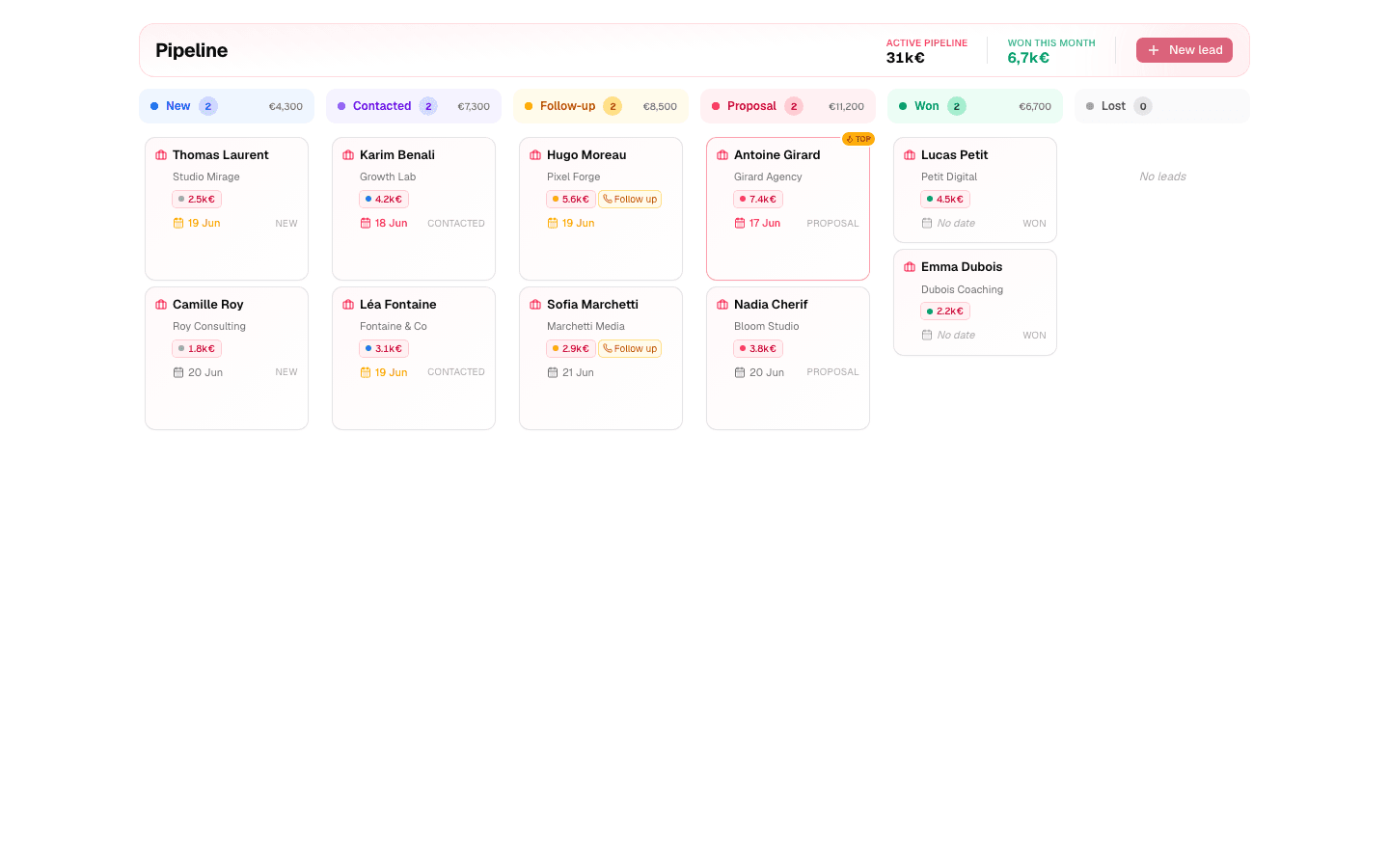
The 6 stages (and when to move from one to the next)
New — the lead just came in, you haven't contacted them yet. They leave this stage the moment your first message goes out.
Contacted — first contact made, no real conversation yet. They move on when they reply or a call gets booked.
Follow-up — you're in discussion: qualifying, answering questions, following up. They move on when you send a proposal… or when silence truly settles in.
Proposal — quote or offer sent, the decision is on their side. This is the stage where follow-ups pay the most.
Won — signed. Record the amount and the date: that's the raw material for your stats.
Lost — didn't happen. Record the reason (price, timing, competitor, no response): loss reasons are your best source of improvement.
The golden rule across all stages: every card carries a next action date. A lead without a date is a lead adrift.
Why 6 columns and not 12
The classic temptation: adding columns. "Qualified", "Demo done", "Negotiation", "Waiting for signature"… Three weeks later, you spend more time wondering which column a lead belongs to than actually following up.
A stage only deserves to exist if it triggers a different action on your side. Following up with a "contacted" lead and a "discussing" lead feels the same? Then it's the same column. This logic almost always lands on 5 to 7 stages for a freelancer — beyond that, you're building a dashboard for nobody.
If your business has a genuine extra step (say, "discovery call booked" when you sell exclusively through calls), add it deliberately. But start at 6: it's easier to add a missing column than to remove three confusing ones.
The 3 health indicators of your pipeline
- Leads without a next action date. The most important indicator — each one is a follow-up that will never happen. Target: zero.
- The distribution across columns. Lots of "New" and nothing in "Proposal"? Conversion problem upstream. A bloated "Follow-up"? Your follow-ups aren't keeping pace with what's coming in.
- The age of the cards. A card that hasn't moved in three weeks in "Proposal" isn't "in progress" — it's dying. Follow it up today or record the loss.
These three checks take two minutes once a week — and tell you exactly where to act.
The 4 classic mistakes
- The museum pipeline: filled once, never updated. A pipeline that lies is worse than no pipeline: it falsely reassures you.
- Ghost leads: dead for a month but still "in discussion" because moving them to Lost hurts. Result: an ego-inflated pipeline and false stats.
- The catch-all column: a "In progress" stage holding most of your cards teaches you nothing. Every column must answer "what do I do for these leads?".
- Cards without amounts: without an estimated value, you can't prioritize. A rough amount beats no amount.
All these mistakes share one root: treating the pipeline as a document to maintain instead of the tool that drives your day.
The pipeline in practice: the Monday review
Every Monday, 5 minutes:
- Count leads per column. If "New" is full but "Proposal" is empty, you have a conversion problem. If "Follow-up" is bloated, you need to accelerate your follow-ups.
- Hunt down cards without a next action date — give them one, right now.
- Look at cards that haven't moved in 2 weeks and decide: follow up today, or Lost with a reason.
The pipeline gives you the snapshot of your sales health; the Today view turns that snapshot into daily actions. Together they form the complete system — walked through step by step in the complete guide to lead tracking. And if you're still running all this on a spreadsheet, read why Excel hits its limits fast.
Ready to stop losing deals to forgetfulness?
Get started free — up to 10 leads, no credit card.
Start for free